


Choosing a user testing plan is less about finding the plan with the longest feature list and more about understanding how your team actually tests.
How often do you run studies? Will you recruit your own participants or need access to a participant panel? How much time can your team spend analyzing sessions? And do you need a simple way to run occasional tests, or a setup that supports continuous research across a larger team?
Those questions matter more than the name of a pricing tier.
For many teams, the decision is no longer just about the cost per test. It is also about workflow. Can your team recruit faster, analyze results in less time, share insights more easily, and keep research connected to product decisions?
That is where modern user testing platforms have changed the equation. Tools now include AI-assisted analysis, transcript automation, reports, collaboration features, and integrations like MCP, which allow product and research teams to bring user data directly into their AI workflows.
The best plan is the one that fits your research rhythm, team structure, and the way you want to turn user feedback into action.
Start with how your team tests
Before comparing prices, look at your research workflow.
A low monthly price can become expensive if your team needs to recruit large numbers of participants, spend days manually analyzing sessions, or pay separately for features it uses every week.
Likewise, a feature-rich subscription may be unnecessary if you only run a small test a few times per year.
The right plan should match the frequency, participants, workflow, and level of research support your team actually needs.
Pay-as-you-go vs. subscription vs. enterprise user testing
Most user testing pricing models fall into a few broad categories.
- Pay-as-you-go or low-commitment: Best when you test occasionally and want to keep fixed platform costs low.
- Subscription: Best when your team runs tests regularly and benefits from more capacity, collaboration, automation, or analysis features.
- Enterprise or custom: Best when you need larger teams, custom procurement, security requirements, specific data policies, or dedicated support.
The cheapest option depends on more than the platform fee.
A team running one study this quarter has very different economics from a product team testing every sprint.
That is why your testing frequency is the first thing to look at.
How frequently will you run user tests?
Testing frequency has a major impact on which pricing model offers the best value.
Occasional user testing
If your team only needs feedback around a major redesign, launch, or occasional product decision, flexibility matters.
Look for a plan that lets you:
- Keep fixed costs low
- Purchase participants when needed
- Run tests without a long-term commitment
- Invite your own users where possible
There is little reason to pay for research capacity your team will not use.
Continuous user testing
The economics change when testing becomes part of the product development process.
Teams that test every month, every sprint, or around recurring releases should look beyond the cost of an individual session.
Features that reduce setup, recruiting, analysis, and reporting work become more valuable when the same work happens repeatedly.
A subscription may therefore make more sense for teams that need higher testing allowances, multiple team members, transcripts, automated analysis, recurring tests, or more flexible participant management.
The more frequently you test, the more important workflow efficiency becomes alongside the price of each individual session.
Will you recruit your own users or use a participant panel?
Participant recruitment can account for a significant part of the cost and effort involved in user testing.
The right setup depends on who needs to participate.
Invite your own participants when you need existing users
Testing with your own customers or users can be particularly useful when previous product experience matters.
You might want to invite your own participants when testing:
- An advanced workflow used by existing customers
- A new feature for a specific customer segment
- Account settings or functionality that requires product knowledge
- Changes to an established product experience
If you already have access to these people, look at how many own-participant sessions a plan allows and whether inviting them creates additional costs.
Use a participant panel when you need fresh users
A built-in participant panel is useful when you need people who are unfamiliar with your product or when recruiting participants yourself would take too much time.
First-time users can reveal problems that existing customers have already learned to work around.
A panel can also make it easier to test quickly without maintaining your own research recruitment process.
For many product teams, the most useful setup is not one or the other. It is both.
Existing customers can show you how experienced users behave, while new participants can show you what the product feels like without prior knowledge.
When comparing user testing plans, check both the cost of recruited participants and the allowance for inviting your own.
Do you need moderated or unmoderated research?
Moderated and unmoderated testing create different workflow and tooling requirements.
In a moderated study, a researcher joins the session, guides the participant, and can ask follow-up questions in real time.
Unmoderated testing lets participants complete tasks independently while recording their experience and thinking aloud.
For focused usability questions and repeated product testing, unmoderated research can reduce scheduling and moderation work and make it easier to collect sessions quickly.
Moderated research is often a better fit when you need to explore unexpected responses, discuss sensitive or complex subjects, or adapt the conversation as you learn.
The question for your pricing plan is therefore not simply which method is better. It is whether the platform and plan support the type of research your team runs most often.
If moderated research makes up a large part of your workflow, check for scheduling and live-session capabilities. If you mainly run unmoderated usability tests, participant access, recordings, test setup, transcription, and analysis features are likely to matter more.
How much analysis work can your team handle manually?
The cost of user testing does not end when the recordings arrive.
Someone still has to understand what happened.
That can include watching sessions, taking notes, identifying recurring problems, creating clips, comparing participants, synthesizing findings, and reporting the results to the rest of the team.
When tests are occasional, manual analysis may be manageable.
When research becomes continuous, those hours add up.
That makes analysis capabilities an important part of a user testing plan.
Depending on your workflow, look for features such as transcripts, AI-assisted notes and insights, highlight clips, automated reports, and ways to search or query previous research.
This is where modern product workflows start to matter. If your team already uses AI in day-to-day work, it helps to choose a platform that can connect user testing data to that workflow instead of forcing a separate analysis process.
This is also where features like AI Insights become valuable. They reduce time spent on manual review and help the team move from raw recordings to clear recommendations faster.
Today's Userbrain workflow is broader than one analysis tab. Teams typically move through a few linked steps:
- Use Auto-create with AI to generate test tasks quickly.
- Run the study with real testers or your own participants.
- Let AI Insights surface patterns, themes, sentiment, and findings across sessions.
- Turn key moments into AI Clips and ask follow-up questions through Ask Userbrain.
That combination matters because it removes the slowest parts of research: setup, review, synthesis, and follow-up questions.
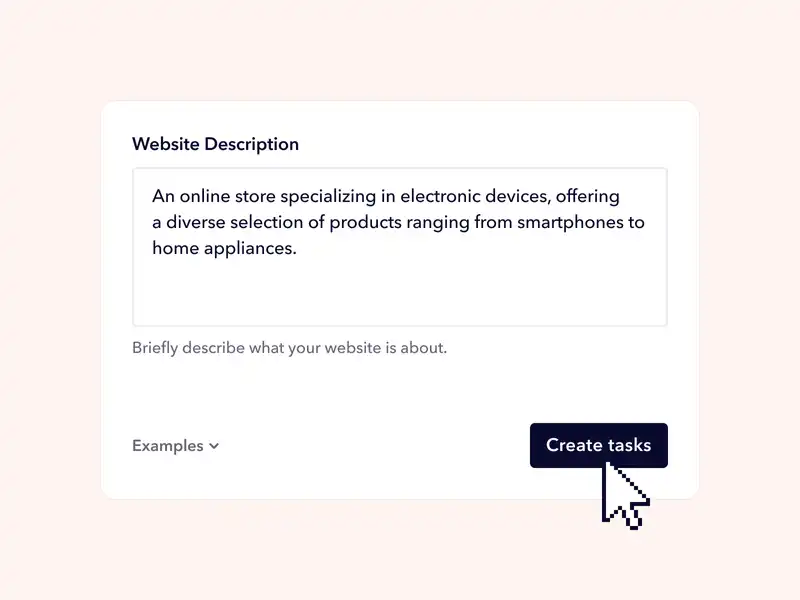
Auto-create with AI
Userbrain can generate the initial task structure for you based on a short description of the product or flow you want to test.
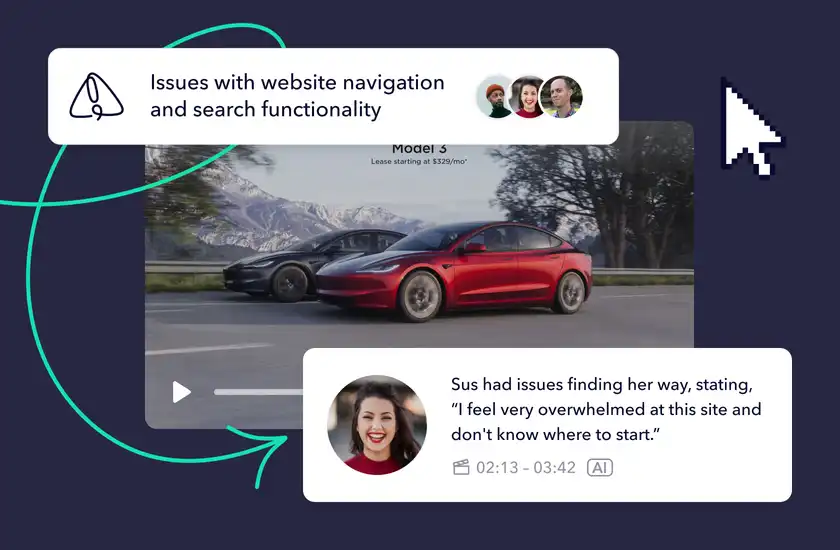
AI Insights
AI Insights analyzes the sessions and highlights the issues, patterns, and sentiment across the videos and transcripts.
AI Clips
Instead of re-watching full videos, you can jump straight to the moments that matter most and share them with the team.

Ask Userbrain
Ask Userbrain turns your sessions into a searchable conversation. You can ask a plain-language question and get source-backed answers with timestamps, snippets, and direct links to the relevant moments.

The goal is not to automate the user out of user research. It is to remove the repetitive manual work so your team can spend more time interpreting evidence and deciding what to do next.
How do AI and MCP fit into the decision?
If your team works in ChatGPT, Claude, or another AI workflow, it matters whether your user testing platform can connect to that environment.
This is where features like Ask Userbrain and MCP integrations can matter. They let teams ask questions about their testing data in context instead of manually searching through recordings, notes, and reports.
For product teams, this is a real workflow gain. Instead of re-explaining the context or copying quotes into a new chat, your AI can help summarise evidence from real user sessions and support faster decisions.
That does not replace real user research. It makes the research easier to use.
How many people need access?
A plan that works for one researcher may not work for a cross-functional product team.
Consider who needs to:
- Create tests
- Manage participants
- Watch sessions
- Review findings
- Share clips or reports
- Access previous research
Seat limits can become important as research becomes more collaborative.
A small team may only need one or two people managing tests. A larger product organization may want designers, researchers, product managers, or other stakeholders to have direct access to findings.
Before choosing a plan, check whether collaboration is included or whether additional seats create significant extra costs.
Do you have enterprise, security, or procurement requirements?
For larger organizations, the right user testing plan may be determined by requirements that have little to do with the number of sessions you run.
Procurement processes, custom billing, security reviews, contracts, data-retention policies, access controls, and dedicated support can all affect which plan is appropriate.
These requirements are easy to overlook when comparing headline prices.
If your organization needs them, identify them before evaluating plans rather than discovering them late in procurement.
What does user testing really cost your team?
Platform pricing is only one part of a user testing budget.
The total cost can also include participant recruitment, incentives, researcher time, test preparation, moderation, analysis, reporting, and the time spent finding and reusing previous research.
That means the lowest subscription price does not necessarily produce the lowest total cost.
A low-commitment option may be the most economical choice for occasional testing.
For a team conducting research every week, however, a plan that reduces repetitive setup and analysis work can be worth more even if the platform fee is higher.
For a broader framework covering research, participants, tools, team time, design, and other UX costs, see our UX Budget guide.
Compare Userbrain user testing plans
Userbrain offers a range of user testing plans designed to cater to businesses of all sizes and budgets. The right fit depends on how often you test, how many people need access, and how much analysis work you want to automate.
For many teams, the decision is not just about how many sessions you get. It is about how much time you save in recruiting, reviewing recordings, sharing findings, and turning feedback into action.
If you're just building a testing habit, Starter gives you a small, steady monthly allowance to keep research going every month without a big commitment. If you run research more often or at higher volume, the value shifts toward recurring testing capacity, collaboration, transcripts, automated reports, and AI-assisted analysis.
This is where Userbrain's product experience starts to stand out. A modern platform is not only a place to run tests. It is also a way to keep user evidence flowing into product work, design reviews, and AI-assisted decision making.
Current pricing snapshot
| Plan | Best for | Includes |
|---|---|---|
| Starter | Small teams building a steady, lighter testing habit | 3 testers/month, 1 test setup/month, 2 seats, AI analysis, transcripts, and automated reports included |
| Plus | Most product and research teams | 10 testers/month, 3 test setups/month, 4 seats, own-user testing |
| Flex | Continuous testing at scale | 30 to 300 testers/year, with additional testers available on demand, 100 invite-your-own-tester sessions/year, unlimited test setups and seats |
| Enterprise | Larger organizations with custom needs | Custom tester packages, broader seats, security reviews, custom contracts, custom billing and support |
Every plan above starts with a 30-day full-access trial, no credit card required.
Core features that matter most for a modern workflow:
- Auto-create test tasks with AI
- AI Insights across sessions
- AI Clips for fast evidence sharing
- Ask Userbrain for natural-language answers
- Transcripts, notes, and reporting built into the workflow
Which type of user testing plan is right for you?
Instead of starting with a plan name, start with your testing behavior.
If you're testing lightly, but want to keep it going
Prioritize a small, steady allowance over a large upfront commitment.
A lighter plan can make sense if you're just starting to build a testing habit or mostly run research around selected releases, redesigns, or high-priority questions, as long as it's billed month to month with no long-term contract.
Pay attention to participant costs and whether you can invite your own users without moving to a larger plan.
If your product team tests continuously
Prioritize repeatability.
Regular testing makes unlimited or higher-volume test setups, participant allowances, collaboration, transcripts, analysis, and reporting more valuable.
The question becomes less about minimizing the cost of one study and more about reducing the cost and effort of running research repeatedly.
If you are a larger organization
Prioritize operational fit.
Team access, security, procurement, contracts, support, participant volumes, and data requirements may matter more than the headline monthly price.
A custom or enterprise plan is usually designed for these constraints.
Features worth comparing before you choose
Do not compare user testing plans by counting features alone. Compare them by asking which parts of your workflow they improve.
- Participant recruitment: Panel size, targeting, screening, participant cost
- Own users: Included sessions, invite links, tester management
- Test setup: Number of active setups, templates, automated or AI-assisted task creation
- Analysis: Transcripts, notes, clips, AI insights, reports
- Collaboration: Seats, sharing, stakeholder access
- Continuous research: Recurring tests, automation, reusable workflows
- Enterprise requirements: Security, contracts, billing, data retention, support
A feature is valuable when it removes a real constraint from your research process.
Features your team never uses should not determine which plan you buy.
Don't compare platforms on price alone
Choosing a pricing plan and choosing a user testing platform are related decisions, but they are not the same thing.
A lower price is not useful if the platform cannot recruit the participants you need, support your preferred research method, or fit into your team's workflow.
Likewise, paying for an extensive research suite may not make sense if your main requirement is simply to run frequent unmoderated usability tests with real people.
If you are still deciding which platform fits your team, see our guide to UserTesting alternatives, where we compare different user testing tools, pricing approaches, strengths, and trade-offs.
Start user testing with a free trial
Before committing to a plan, consider taking advantage of Userbrain's 30-day free trial, which includes 2 panel testers and unrestricted access to all features.
This trial allows you to experience the platform and better understand how user testing can benefit your business. After the trial, you can make an informed decision about which plan best suits your needs.
Questions to ask before you choose
Before you commit, answer these questions:
- How often do we realistically expect to run user tests?
- How many participants do we typically need per study?
- Will we recruit our own users, use a participant panel, or both?
- Do we mainly run moderated or unmoderated research?
- How much time does our team currently spend setting up and analyzing tests?
- How many people need access to research and findings?
- Which analysis and reporting features would genuinely save us time?
- Do we have security, procurement, billing, or data-retention requirements?
- Are we optimizing for the lowest platform cost or the lowest overall research cost?
Once you know the answers, comparing plans becomes much easier.
Try before you commit
Whenever possible, use a trial or low-commitment option before making a larger purchase.
Run a real test rather than simply exploring the interface.
Set up a study, recruit or invite participants, watch the recordings, analyze the findings, and share the result with someone on your team.
That tells you much more about whether a platform fits your workflow than a feature comparison alone.
Userbrain currently offers a 30-day free trial. Check the pricing page for the latest plan details.
The best user testing plan fits your research rhythm
There is no single user testing plan that is right for every team.
The best choice depends on how frequently you test, who you need to recruit, how your team works with research, and how much operational overhead you want the platform to remove.
If you only test occasionally, flexibility and low fixed costs may matter most.
If user testing is a continuous part of product development, the value shifts toward repeatable workflows, collaboration, participant access, and faster analysis.
And if your organization has more complex operational requirements, the right plan needs to satisfy those constraints as well.
Start with how you want research to work. Then choose the plan that supports it.
Userbrain makes it easy to bring real user feedback into whatever AI tool you already use. AI Insights, Ask Userbrain, and AI user testing help product teams move from raw findings to action faster. Start your free trial →