


In the dynamic world of user testing, tools and platforms continually evolve to meet the ever-changing needs of UX researchers and product managers. One such tool that has undergone a significant transformation is UsabilityHub, now rebranded as Lyssna. While Lyssna offers a range of features to enhance user testing experiences, there are several other tools in the market that might better suit your specific needs as a UX researcher. In this article, we’ll explore six of the best Lyssna alternatives for user testing in 2026.
Start testing in minutes and get results within hours. Tap into our pool of 180k+ testers and watch videos of users interacting with your product on their devices. Discover what’s working for your product, and what’s not!
Start your free trialWhat is Lyssna? Should I consider Lyssna alternatives?
Lyssna, formerly known as UsabilityHub, is a platform that focuses on quick and straightforward user feedback. Their rebranding signifies a renewed commitment to providing users with actionable insights to improve user experiences. Fun fact: The name “Lyssna” is inspired by the Swedish word for “listen.” However, while Lyssna has its strengths, it’s essential to consider various options to find the perfect fit for your product. So let’s take a closer look at some Lyssna alternatives, shall we?
The 6 best Lyssna alternatives for user testing in 2026
1. Userbrain

Userbrain, as the go-to user testing tool for UX researchers, stands out in the crowded user testing landscape. Designed with a commitment to simplicity and efficiency, Userbrain ensures that users receive regular feedback from real users. This continuous feedback loop allows users to make informed decisions at every stage of development, ensuring that the end product resonates with its target audience.
Pricing
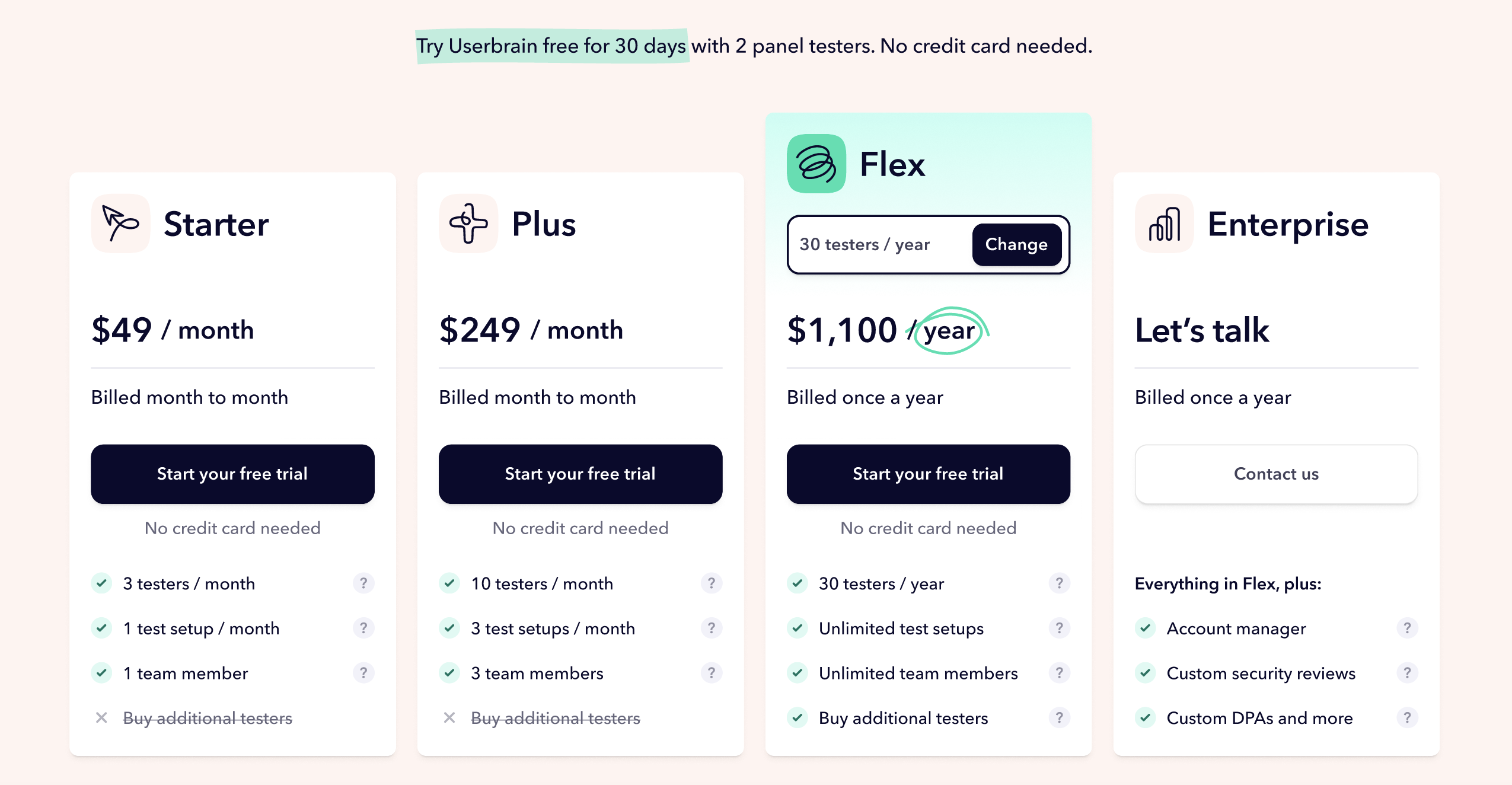
Userbrain’s pricing is transparent and caters to businesses of all sizes, with both monthly and yearly subscription options, starting from just $49 a month, which includes 3 panel testers every month, no need to buy testers separately. Every plan includes all testing and analysis features, AI insights, transcripts, and automated reports. Nothing is held back for a higher tier. Every new account starts with a 30-day free trial: 2 panel testers, 5 sessions with your own users, and access to all testing and analysis features, no credit card required.
Key Features
Before diving into the comprehensive features that Userbrain offers, it’s essential to highlight two standout functionalities that set the platform apart: AI powered user testing and Presentation-ready Reports.
AI user testing harness the power of artificial intelligence to sift through user feedback, identifying patterns and key areas of interest. This ensures that users don’t just receive raw data but actionable insights that can drive decision-making.
On the other hand, Presentation-ready Reports are a testament to Userbrain’s understanding of the corporate ecosystem. Recognizing that insights often need to be shared across teams or presented to stakeholders, Userbrain ensures that the feedback is not only insightful but also packaged in a format that’s ready for boardroom presentations.
Now, let’s delve deeper into the myriad of features that make Userbrain “your go-to user testing tool”:
- Continuous Feedback: Unlike many other platforms that only offer one-off tests, Userbrain emphasizes continuous user testing. This ensures that users can receive regular insights, helping them iterate and improve their products constantly, should they wish.
- Diverse Tester Pool: With a community of 180k+ active testers, Userbrain boasts a diverse pool of testers from various demographics, ensuring that feedback is holistic and representative.
- Intuitive Dashboard: Userbrain’s dashboard is designed for ease of use, allowing businesses to set up tests, view results, and gain insights without any hassle.
- Seamless Integration: Userbrain can be easily integrated into the product development cycle, ensuring that user feedback is an integral part of the design and development process.
- Affordability: True to its catchphrase, Userbrain offers “easy, fast, and affordable user testing.” This ensures that even startups and small businesses can benefit from high-quality user insights without breaking the bank.
- Auto-create test tasks: Describe what you want to test in plain language and generate the tasks and questions instantly.
- Ask Userbrain: Ask plain-language questions about your results right in the dashboard.
- MCP Integration: Connect Userbrain to Claude, ChatGPT, or other AI tools and query your test results directly from your AI tool of choice.

Userbrain reviews – via G2
Customers often praise Userbrain for its intuitive interface, quality of testers, and the actionable feedback provided. The platform’s emphasis on continuous feedback is particularly appreciated, as it ensures that businesses can stay ahead of user needs and preferences.
Overall – Userbrain is the best alternative to Lyssna 🏆
So, why does Userbrain top the list of Lyssna alternatives? With its unique features and commitment to continuous feedback, Userbrain truly stands out as a top choice for users looking to optimize their product’s user experience. Whether you’re a startup or an established enterprise, Userbrain’s “easy, fast, and affordable user testing” ensures that you always have your finger on the pulse of your users’ needs, making Userbrain the perfect alternative to Lyssna for user testing.
2. Lookback

Lookback, a renowned name in the realm of user testing, offers a platform that emphasizes real-time user feedback and collaboration. With its generous suite of tools, Lookback provides users the opportunity to gain deep insights into user behavior, ensuring that products and services resonate with their target audience.
Pricing
Lookback’s pricing is structured to accommodate a variety of business needs:
- Starter: $59 per month – Ideal for individuals or small teams looking to get started with usability testing.
- Business: $99 per month – Designed for larger teams with more extensive testing needs, offering additional features and integrations.
- Enterprise: Custom pricing available upon request, tailored to organizations with specific requirements and larger-scale operations.
Key Features
- Real-time Interviews: Enables businesses to interact with users in real-time, ensuring immediate feedback and a more interactive testing experience.
- Self-test: Allows users to test at their own pace, providing businesses with genuine, unmoderated feedback.
- Collaborative Notes: Team members can collaborate and take notes during sessions, ensuring collective insights and observations.
- Rich Insights: With high-quality video and audio recordings, businesses can gain a comprehensive understanding of user behavior and preferences.
Lookback Reviews – via Capterra
Lookback’s users often appreciate the platform’s ease of use, especially when conducting usability studies with prototypes. The real-time feedback and collaborative features are frequently highlighted, ensuring a more interactive and insightful testing experience. However, some users have pointed out occasional technical difficulties and the need for broader browser and device support.
Overall – Lookback is a very good Lyssna alternative 🥈
With its focus on real-time feedback and collaboration, Lookback stands out as a top-tier usability testing platform. For businesses aiming to gain deep, actionable insights into user behavior, Lookback provides a robust and efficient solution, making it a prime alternative in the usability testing landscape.
3. UX Tweak

UX Tweak, a prominent player in the user testing arena, offers a suite of tools tailored to enhance website user experience. With its focus on providing actionable insights into user interactions, UX Tweak empowers businesses to identify and address potential usability challenges effectively.
Pricing
UX Tweak’s pricing structure is designed to cater to a wide range of businesses:
- Free: $0 plan available.
- Business: $92/month, billed annually.
- Enterprise: Custom pricing available on request, tailored for larger organizations with specific requirements.
Key Features
- Session Replay: A feature that captures every user action on a website, offering a comprehensive view of user behavior.
- Live Testing: Enables businesses to validate usability in real-time, ensuring immediate and relevant feedback.
- Custom Test Designs: Allows businesses to personalize user tests, ensuring the test’s appearance and flow align with their branding and objectives.
UX Tweak Reviews – via Capterra
Users of UX Tweak often highlight the platform’s ease of use and the quality of insights provided. The support service is frequently praised, with users appreciating the platform’s responsiveness and helpfulness. However, some users have pointed out occasional lags in recording and potential improvements in design elements.
Overall – UX Tweak is a good Lyssna alternative 🥉
With its comprehensive set of features, flexible pricing, and emphasis on actionable insights, UX Tweak emerges as a strong alternative in the usability testing domain. For businesses looking for a reliable and efficient platform to optimize their website’s user experience, UX Tweak offers a compelling choice. Looking to jump ship from UX Tweak entirely? Our top UX Tweak alternatives covers more options for your business needs.
4. UserZoom/UserTesting

UserZoom and UserTesting, now unified under a single banner, have long been recognized as heavyweights in the usability testing domain. Their combined expertise offers businesses a comprehensive platform to gather actionable insights from real users, ensuring that products and services are optimized for the best user experience. Therefore, no list of Lyssna alternatives would be complete without the inclusion of UserTesting.
Pricing
UserZoom/UserTesting offers a range of pricing options tailored to different business needs:
- Advanced: Designed for solo researchers or small teams, with pricing available upon request.
- Ultimate: Geared towards larger teams with more extensive testing requirements, pricing details available upon inquiry.
- Ultimate+: Custom pricing tailored to large-scale operations and specific organizational needs.
Key Features
- Diverse Testing Options: From quick tests to longitudinal studies, the platform offers a range of testing methodologies.
- Advanced Targeting: Ensure the right participants for your tests with detailed demographic and behavioral targeting.
- Integrated Video Insights: High-quality video recordings provide a deep understanding of user interactions and pain points.
- Collaborative Workspace: Teams can collaborate, share insights, and make informed decisions collectively.
UserTesting Reviews – via Capterra
Customers frequently commend UserZoom/UserTesting for its intuitive interface and the depth of insights provided. The platform’s diverse testing options and advanced targeting capabilities are particularly appreciated. However, some users have mentioned challenges with integration and the pricing structure.
Overall – UserTesting is a great Lyssna alternative for users with deep pockets
With its extensive suite of tools and features, UserZoom/UserTesting stands out as a comprehensive solution for usability testing. For businesses with large UX budgets seeking deep, actionable insights, UserTesting offers a robust and efficient approach, solidifying its position as a decent alternative in the market. If a smaller budget is more your speed, our list of UserTesting alternatives is worth a look.
5. Hotjar (now Contentsquare)

Hotjar, with its unique blend of analytics and feedback tools, empowers businesses to truly understand their users. By visualizing user interactions and gathering direct feedback, Hotjar provides a holistic view of the user experience, enabling businesses to make data-driven decisions, positioning itself as a worthy competitor on our list of Lyssna alternatives. Note: Hotjar is being folded into its parent company Contentsquare, so new signups now go through Contentsquare directly, but the product and pricing below are still what you’ll get.
Pricing
Hotjar’s transparent pricing caters to a range of business sizes:
- Free: $0, limited features.
- Experience Analytics Growth: From $49/month, billed annually.
- Voice of Customer Growth: From $99/month, billed annually.
- Pro and Enterprise: Custom pricing for large-scale operations with specific requirements.
Key Features
- Heatmaps: Visualize where users click, move, and scroll on your site.
- Session Recordings: Watch real users navigate through your site, identifying pain points and areas for improvement.
- Surveys: Gather direct feedback from users with targeted surveys.
- Conversion Funnels: Identify drop-off points in your user journey and optimize for better conversions.
Hotjar Reviews – via Capterra
Hotjar’s users often highlight the platform’s ease of implementation and intuitive interface. The heatmap tool and session recordings are frequently praised for the depth of insights they provide. However, some users have pointed out concerns regarding pricing for premium plans and potential privacy issues for site visitors.
Overall – Hotjar is a worthy alternative to Lyssna
With its diverse set of tools, Hotjar stands out as a multi-faceted solution for understanding user behavior and gathering feedback. For businesses aiming to optimize their user experience based on quantitative data, Hotjar offers a versatile and efficient approach, making it a decent choice in the user testing landscape. Still exploring your options? Our top Hotjar alternatives for product designers covers more ground.
Wrapping up: The 6 best Lyssna alternatives for user testing
In the dynamic world of user testing, having the right tools at your disposal is paramount. While there are numerous platforms available, each with its unique strengths, Userbrain consistently emerges as a top choice for businesses of all sizes looking for Lyssna alternatives. With its emphasis on continuous feedback, diverse tester pool, and commitment to simplicity, Userbrain ensures that businesses remain attuned to their users’ needs. As you navigate the challenges of optimizing user experience, remember that Userbrain stands ready as your go-to user testing tool, offering insights that are both easy to obtain and actionable. Embrace the future of user testing with confidence, knowing that Userbrain has got your back.
Your next steps with Userbrain
Begin your user testing journey, with 2 free testers. Start your free trial! 🚀
Need a hand? Schedule a call with one of our user testing experts. 👋