


Imagine you've just watched a user test where the participant spent 12 minutes clicking around your homepage, never once finding the feature you needed them to evaluate. The task you gave them: "Use the website." Too broad. No useful signal.
Now imagine the opposite. You gave them a task so specific it might as well have been a tutorial: "Click the 'Gift Finder' button in the top navigation." They found it in three seconds. You learned nothing.
Most usability tasks fail in one of these two directions. Stepped tasks are the method that threads the needle between them.
What is a stepped task?
The idea is simple: instead of writing one task at a fixed level of specificity, you write a sequence of tasks that start broad and get progressively more precise.
Think of it like a treasure hunt. The first clue is vague on purpose, pointing you toward a general area. If you find the treasure, great. If you don't, you get a second clue, a little more specific. Then a third. Each clue narrows the search until you either find the treasure on your own or the map points you directly to it.
In user testing, "finding the treasure on your own" is exactly what you're measuring. Can users discover this feature, complete this flow, or navigate to this page without being explicitly told how?
Why starting broad isn't enough on its own
Open-ended tasks are good research. "Explore the app however you'd like" reveals how users naturally enter and navigate a product. But purely open tasks have a real limitation: participants might never encounter the thing you need to learn about.
If you're testing a new filtering feature and your task is "find a product you'd like to buy," half your participants may never touch the filters. You've observed behaviour, but not the behaviour that matters. You walk away with no data on the thing you shipped last quarter.
That's the gap stepped tasks fill. You begin with the broadest framing possible, and only introduce specificity when a participant can't complete the task on their own. The result is data that's honest about discovery (did users find it without prompting?) and still reliable about usability (did users succeed when guided?).
How to write a stepped task sequence
The structure is straightforward. Each sequence should have two to four steps, moving from goal-level to feature-level. If you're not yet familiar with what makes a good usability task, that's worth reading first.
Start with the goal
This is the thing a real user would actually want to do: "Find a gift for a friend's birthday." No mention of any specific feature, section, or UI element.
Introduce a context hint
If the participant can't complete the first step, add a nudge that names the general area without naming the exact feature: "Check out the 'Gift Ideas' section for some inspiration." You're narrowing the search, not solving it.
Be explicit as a last resort
If they're still stuck, point them directly: "Use the 'Gift Finder' tool to select a gift within your budget." Now you're testing usability of the feature itself, not discoverability.
A few practical rules: keep each step to one clear action. Don't stack multiple instructions into a single task. And don't reveal the answer in the first step by accident — avoid naming UI elements or features the user should be discovering on their own.
Stepped task examples across three product types
These examples show what you're actually measuring at each step.
Shopping website: finding a gift
Task 1
Find a gift for a friend's birthday.
Tests whether users can self-navigate to a gift-relevant section.
Task 2
Check out the 'Gift Ideas' section for inspiration.
Tests whether users can work with the section once directed to it.
Task 3
Use the 'Gift Finder' tool to select a gift within your budget.
Tests whether the tool itself is usable once found.
Fitness app: planning a workout
Task 1
Plan a workout for your evening.
Tests whether the app's main navigation makes workout planning obvious.
Task 2
Explore the app for a workout that focuses on cardio.
Tests whether users can filter or browse by category.
Task 3
Try scheduling a workout using the 'Workout Planner' feature.
Tests whether the scheduling flow is clear once the feature is named.
Travel booking site: planning a trip
Task 1
You're planning a trip to Paris. Start planning your itinerary.
Tests whether the homepage supports trip planning as a natural starting point.
Task 2
Look for hotel options in the heart of Paris.
Tests whether users can navigate to accommodation search.
Task 3
Use the 'Map View' feature to find hotels near the Eiffel Tower.
Tests whether the map feature is useful and usable once introduced.
In each case, you can stop a participant the moment they complete a step successfully. If they find the gift without ever needing the Gift Finder prompt, you record that and move on. You only proceed to the next step if they're stuck.
Using stepped tasks in unmoderated user tests
Stepped tasks were originally developed for moderated research, where a facilitator watches in real time and decides when to introduce the next clue. If a participant reaches the goal on their own, the moderator stops them there — they never see the more specific tasks at all.
In unmoderated testing, you can't make that call in real time. But you don't need to run separate tests for each step. Instead, add all three tasks in sequence and phrase the later ones conditionally, so participants who already reached the goal can move past them naturally.
Using the travel booking example from above:
Task 1
You're planning a trip to Paris. Start planning your itinerary.
Task 2
Look for hotel options in the heart of Paris.
Task 3
If you haven't already, use the 'Map View' feature to find hotels near the Eiffel Tower.
One small addition that makes analysis much faster: after Task 1 and Task 2, add a single-choice question:
Follow-up question
Did you find what you were looking for? Yes/No/Not sure
This gives you an explicit split between participants who discovered the feature on their own and those who needed the prompt in Task 2 or 3, without watching every recording to figure it out. Single-choice questions are a standard question type in Userbrain, so you can add one between any two tasks in a few seconds when setting up your test.
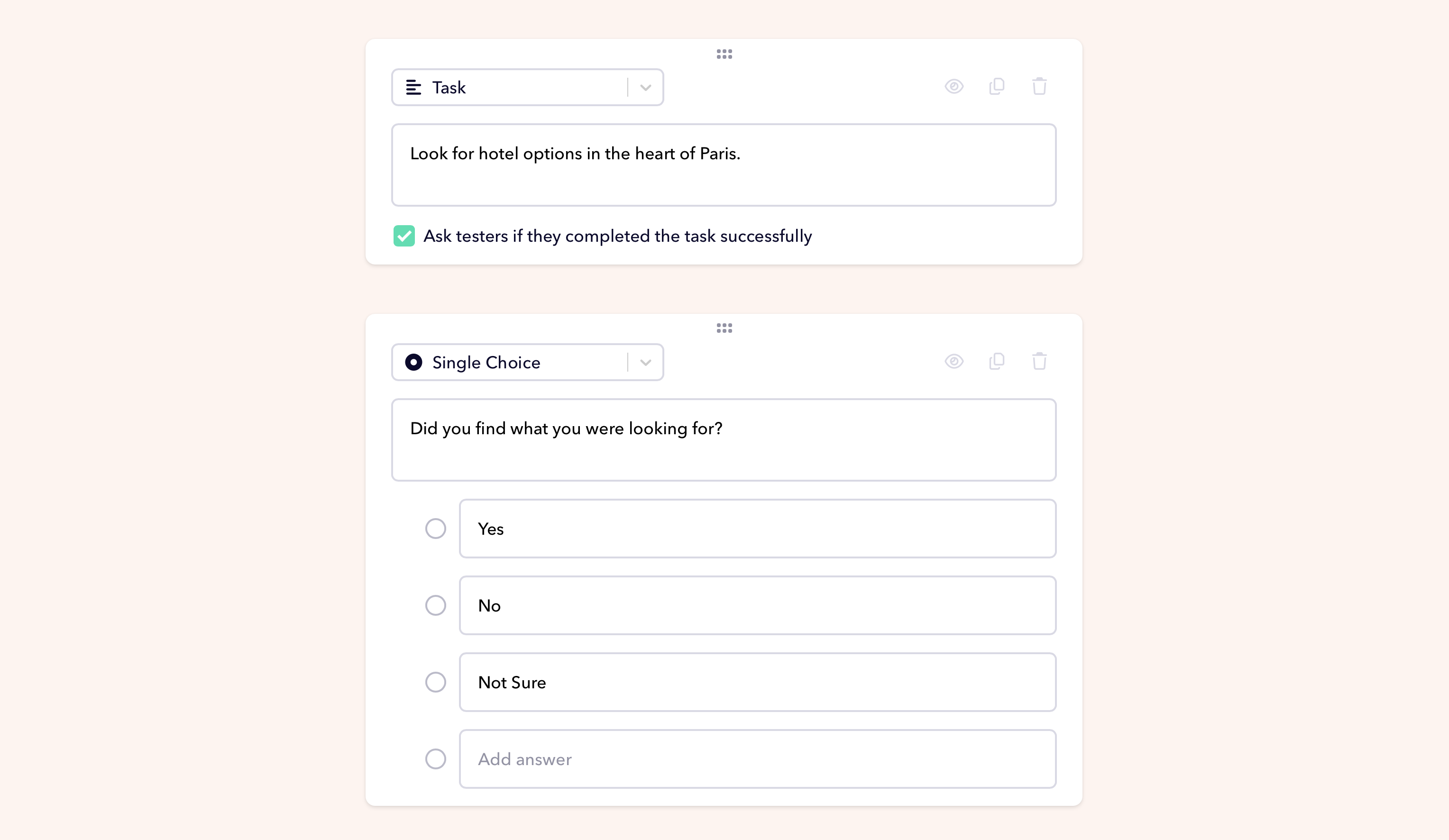
The phrase "if you haven't already" does the work a moderator would normally do. Participants who reached the map view on their own skip past it without repeating themselves. Participants who didn't get there are directed explicitly, so you still get usability data even when discoverability fails.
AI Insights is particularly useful when reviewing these sessions — it surfaces patterns across recordings automatically, so you can quickly see at which step most participants needed the explicit prompt.
The real point of the method
Stepped tasks aren't about making things easier for participants. They're about making your research more honest.
A single broad task tells you if something is discoverable. A single specific task tells you if something is usable. Neither tells you both. The stepped approach keeps you from conflating the two, which is how a lot of "the test went fine" conclusions end up covering real usability problems that nobody tested properly.
Start broad. Watch what happens. Add a clue only when you need one. That's the whole method.
Userbrain makes it easy to run stepped task tests with real users. Set up your first test in minutes or bring your own testers if you want to run sessions with your existing customers.
