


Synthetic users failed the hardest task in our test the same way real users did. That’s interesting. But they also succeeded where real users failed, on a different task. Either way, you can’t trust the results without real users to compare against.
This experiment was run on a prototype of our own pricing page. We built Userbrain, which is a tool for real UX testing, and the workflow at the end uses our product. That’s a conflict of interest on every level: author, prototype, and recommended tool are all the same company. We’re publishing this anyway because the findings are worth discussing.
What are synthetic users?
Synthetic users are AI models prompted to act like real users. You give them a task, screenshots or access to your product, and instructions. They describe what they would do as if they were participants in a test. The appeal is obvious: no participant recruiting, no scheduling, no waiting. You can test something the moment the idea shows up.
The question is whether they behave like real users or just sound like they do.
We ran a small experiment to find out. The short answer: it depends on how you prompt them. They have a real ceiling, and in our test they failed in the same place real users did on one task, and succeeded where real users failed on another. Both halves matter.
How we set up the experiment
We compared five real-user sessions run in Userbrain with five synthetic-user sessions run in ChatGPT. The prototype was our pricing page: multiple plan tiers, a tester-package dropdown, hover states, and a feature comparison table below the fold. Both groups had to find the cheapest option for different scenarios.
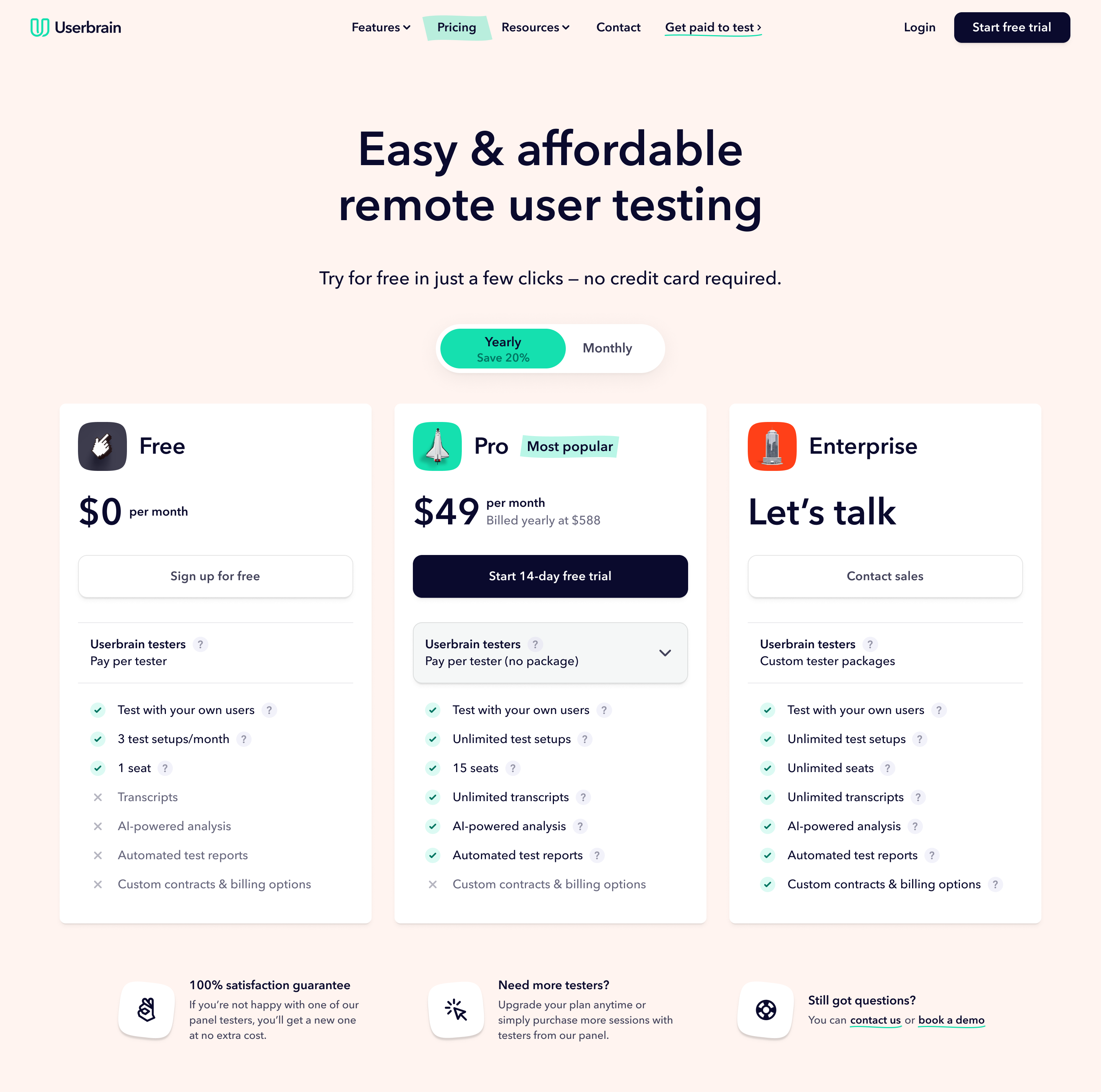
Here’s the starting point of the prototype we used for both groups.
Why AI users behave differently from real users
Before the comparison, we hit a basic problem with how LLMs approach tasks.
Here’s a synthetic user with a basic prompt:
In the visible FAQ, it says if I need more Userbrain testers, I can buy additional testers on a pay-per-use basis at $45 each. That gives me a way to combine a package with extra testers.

So I start doing the math:

If I just did 15 testers pay-per-use, that would be 15 × $45 = $675

If I used the 3 testers/month package and added 12 testers, that would be $125 + (12 × $45) = $665

If I used the 5 testers/month package and added 10 testers, that would be $199 + (10 × $45) = $649
The problem isn’t that it made mistakes. It’s that it behaved like a patient accountant working through every possible combination. Real users don’t do that.
This does not seem tied to one model. UXAgent, a 2025 CHI paper on LLM-based usability testing, found the same pattern. In e-commerce tasks, AI agents followed neat paths while real users wandered, second-guessed themselves, and sometimes gave up. Their conclusion: you can’t point an LLM at a usability test and expect human behaviour. These models are built to find good answers.
Left unchecked, a synthetic user will audit the logic of your interface without showing you where real people get lost.
Does better prompting fix the problem?
Before the final test, we changed the prompt. The goal was to make the model behave more like a real user: scan, stop when something looks good enough, make assumptions, and avoid doing too much maths. We also told it to use only what was visible in the screenshots. That helped reduce invented details.
After that, the AI sessions looked more human. They were less certain and more willing to stop early:
I’m not totally sure whether that means I can only run 3 people or 3 tests. So I check that info too... I take that to mean one setup is like one study, not one person. So 5 users in one test still seems possible.
The problem is that there’s no standard for knowing when a prompt is good enough. We adjusted based on judgment, not a defined standard.
The best check is also circular: run real sessions alongside synthetic ones and compare. If synthetic users miss the same things real users miss, the prompt is in the right territory. If they sail through tasks that real users fail, it needs more work.
That means synthetic testing requires real UX testing to validate. You need real sessions to know whether the synthetic ones worked, which limits how much time you save upfront. That does not make the approach useless, but it does limit it.
Where synthetic users matched real users, and where they didn’t
Task one: find the cheapest option for 20 qualified users per month.
All five synthetic users found the correct answer. Only three of five real participants did.
This is not a win for synthetic testing. It shows the ceiling. The AI moved past friction that real users got stuck on: the hesitation, the wrong turn, the moment someone gives up. That’s what real UX testing is meant to surface, and the synthetic sessions missed it.
Task two: find the cheapest option for 15 users on a one-time project.
The cheapest option was less obvious than either group realised. Getting to it required people to notice the billing toggle, change the billing period, choose a less obvious package, and add extra testers. The page did not make that path clear. Users had to connect information from two places and do maths the interface never asked for.
All five real participants missed it. Three of five synthetic users missed it too, arriving at the same wrong answer through the same reasoning:
If I need 15 of them one time, that’s 15 × $45 = $675... I’d choose Free with pay per tester... For a one-time project, I wouldn’t want a monthly or yearly tester package.
And from a real participant working through the same scenario:
Well, there’s no option for one-time need because this is an annual plan. The only one that you can do a single test with is the free plan based on all appearances here... one time, again, would be the free plan... so, yeah, what did I say? $675 in the free plan.
Both groups fixated on the visible pay-per-tester pricing, ignored the combined option, and landed on the same number. That’s the same problem surfacing in the same way.
Can you trust synthetic UX testing results?
The shared failure matters. The synthetic and real users had no access to each other’s sessions. They still reached the same wrong answer for the same reason. That’s a useful signal.
But task one pulls in the other direction. The synthetic users pushed through friction that stopped real users. If we’d only looked at task one, we’d have thought the page worked. Synthetic users sometimes match real users and sometimes don’t. Without real users, you can’t tell which case you’re in.
You can use synthetic users to prepare, test early ideas, and catch obvious issues. You can’t use them to replace real testing. Synthetic results only become trustworthy when you compare them with real ones.
The honest framing is that synthetic users are preparation for real UX testing, not a substitute for it.
Limitations of our experiment
Five participants per group is a small sample. The shared failure is a signal, not statistical proof. Nielsen Norman Group reached a similar conclusion across larger samples: useful for building hypotheses and preparing for real research, not for replacing it.
We tested our own product. That may have shaped the tasks or how we read the results.
Prompting is unsolved. There’s no standard for knowing when a synthetic-user prompt is realistic enough. We relied on judgment and comparison with real sessions.
We tested one task type. Pricing comparison is logic-heavy, which suits AI once the prompt is right. More open-ended or emotional tasks would likely show a larger gap between synthetic and real behaviour.
The finding depends on the prompt. If your synthetic users always succeed where real users struggle, the prompt isn’t right and the comparison isn’t valid.
How to run synthetic user tests yourself
Tell the model to behave like a non-expert user: scan instead of reading, stop when something looks good enough, use only what is visible, and don’t invent details. Expect to adjust the prompt several times before the output feels realistic.
Use separate, fresh conversations with ChatGPT, Claude, or whichever model you prefer. Use one new conversation per session so the model can’t share context. Share screenshots of your prototype and give tasks one at a time, just like you would in a real session.
Run at least three sessions before drawing conclusions. Look for patterns across runs, not results from any single session. Run real sessions alongside: without a real-user baseline, you have no way to know whether your prompt is working or producing confident-sounding nonsense.
The lesson we learned isn’t whether synthetic users work. It’s that you can’t know whether they worked without running UX tests with real users.