


Userbrain was founded upon the belief that digital products should improve the quality of our lives. This belief has driven us to provide tools that help creators build products with the user in mind. Today, we take another step in achieving our mission to help the creators who have put so much faith in us succeed. We’re proud to introduce mobile app user testing for Android and iOS, a feature directly encouraged by our users.
Start testing in minutes and get results within hours. Tap into our pool of 180k+ testers and watch videos of users interacting with your product on their devices. Discover what’s working for your product, and what’s not!
Start your free trialMobile app testing: listening to user feedback
The needs and wishes of our users direct our journey. You asked for a robust, easy-to-use mobile app testing tool, and we listened! We’ve poured over your feedback, dissected your requests, and used them to shape the very core of our mobile app testing feature. After all, it would be a bit hypocritical for us to ignore user feedback, wouldn’t it?
iOS vs. Android: what to test differently
Testing a mobile app on iOS and testing the same app on Android are not the same job. The features might be identical between the two builds, but the platforms train users to expect different things, and the way you plan and run your tests should account for that.
Design conventions: Apple’s Human Interface Guidelines vs. Google’s Material Design
Apple’s Human Interface Guidelines and Google’s Material Design steer app design in genuinely different directions, and users absorb those conventions whether they realize it or not.
- Navigation placement: iOS apps typically anchor primary navigation in a tab bar at the bottom of the screen, with a small, fixed set of top-level destinations. Android apps use bottom navigation too, but are just as likely to rely on a navigation drawer (the “hamburger” menu that slides in from the side) for a longer list of destinations.
- Back behavior: iOS users expect to go back by swiping in from the left edge of the screen, or tapping a back button in the top-left corner. Android has a dedicated back gesture or back button built into the OS itself, so users expect it to work consistently across every app, not just yours.
- Tab bar vs. drawer: because of the above, the same information architecture can feel natural on one platform and cluttered on the other. A flat, tab-based structure that works well on iOS can feel restrictive on Android, where users are more used to nested menus.
When you’re running iOS mobile app testing alongside an Android build, watch for testers instinctively reaching for gestures your app doesn’t support. That’s a signal the design is fighting the platform, not fitting it.
What users expect from each platform
iOS and Android users bring different assumptions into a test session. iOS users tend to expect one clear, correct path through a task. The App Store’s more curated ecosystem and Apple’s stricter design review process train users to expect polish and a single “right” way to do things. Android users are more accustomed to variety: different manufacturers (Samsung, Google, OnePlus, and others) ship their own interface skins on top of the OS, so Android users are used to navigating small inconsistencies between apps and adapting on the fly.
This matters when you’re interpreting results. A moment of hesitation that would be a red flag in iPhone app usability testing might be unremarkable in an Android session, simply because Android users are more used to figuring things out as they go.
Device fragmentation: how many devices do you actually need?
Apple’s device matrix is narrow: a handful of iPhone models, one manufacturer, one OS. Android’s is enormous: dozens of manufacturers, wildly different screen sizes and aspect ratios, custom interface skins layered on top of the base OS (Samsung’s One UI, for example, looks and behaves differently from stock Android), and a long tail of devices still running older OS versions.
In practice, this means iOS mobile app testing can usually get away with covering fewer device and OS combinations and still catch most usability issues. Android testing benefits from deliberately testing across a spread of screen sizes, manufacturers, and OS versions, because a layout or interaction that works cleanly on one device can break on a budget device with a different manufacturer skin. If your test budget is limited, weight your Android coverage toward the devices your actual user base uses most, rather than trying to cover every combination.
Distribution: getting a beta build in front of testers
How you get a pre-release build to testers differs by platform too. On Android, you can distribute a beta through Google Play’s internal or open testing tracks, or in some cases share an installable file directly. On iOS, beta distribution runs through TestFlight, which requires testers to install the TestFlight app and accept an invite before they can open your build. That extra step can add friction to recruiting and onboarding testers for a pre-launch iOS test, so it’s worth building a little more lead time into an iOS test plan than you would for Android.
Writing tasks that work on both platforms
The same task instructions do not always read naturally on both platforms. A task written with iOS conventions in mind (like “tap the back button in the top corner”) can confuse an Android-native tester whose muscle memory is a swipe or a hardware back button. When you’re testing the same feature on both platforms:
- Describe the goal, not the gesture. Write “find your way back to the home screen” rather than naming a specific button or swipe, so testers on either platform can use whatever navigation method feels natural to them.
- Avoid platform-specific terminology. A “long-press” behaves differently across platforms, and terms like “hamburger menu” may not mean anything to a tester who has never encountered a navigation drawer.
- Run iOS and Android as separate tests, not one test with two links. Reviewing results side by side is far easier when you’re not trying to untangle which platform’s quirks caused which behavior.
Getting this right matters more than it might seem. The best usability testing tools for mobile apps make it just as easy to set up an Android test as an iOS one, but the thinking behind the task instructions still has to account for the platform your testers are actually using.
Proof in practice: how Gecko Alliance tested their app before writing a line of code
Gecko Alliance manufactures electronics for spas and hot tubs, control panels, pumps, lighting, and the companion mobile apps that control them. As the company shifted toward more software-driven products, the team needed to know whether their app’s interface actually made sense to users, and whether it held up against the competition, before committing engineering time to build it.
Using Userbrain, Gecko ran a side-by-side comparison test: real users were shown their proposed interface alongside a competitor’s, and asked which one they found easier to use and why. The result wasn’t a guess. It was evidence.
"Before we wrote a single line of code, we had proof. I could show my team the results: real users choosing our interface over the competition."
Dannik Gagnon, Product Designer at Gecko Alliance
That’s the difference between mobile app user testing done early and mobile app user testing done as an afterthought. Gecko didn’t have to defend a design decision with opinion. They had testers on record choosing it.
User testing for mobile apps – easy, fast, and affordable!
Userbrain is built on three foundational pillars – simplicity, efficiency, and affordability. We stand by these values as we roll out our Android and iOS mobile app testing feature. User testing should not be a complex or expensive endeavor. Our aim with this tool is to offer you an easy, fast, and affordable method to gain valuable insights into your users’ experience with your mobile app.
Helping users build user-centric apps: Userbrain’s mission
As creators who care about the people you’re building for, we know you’re dedicated to improving their lives through your digital products. Our Android and iOS mobile app testing tool is designed to empower you in fulfilling this commitment. Harness the power of real user insights to improve user engagement, increase conversions, and deliver an app that resonates with your users. Because at Userbrain, we’re all about helping you build user-centric digital products, whether they be apps, websites, or prototypes.
How mobile app user testing works
Mobile app testing is about more than finding bugs. It’s about understanding your users – how they interact with your app, what challenges they face, what they enjoy, and where they wish for more.
With Userbrain’s mobile app testing tool for Android and iOS, you can unravel these insights in 3 easy steps:
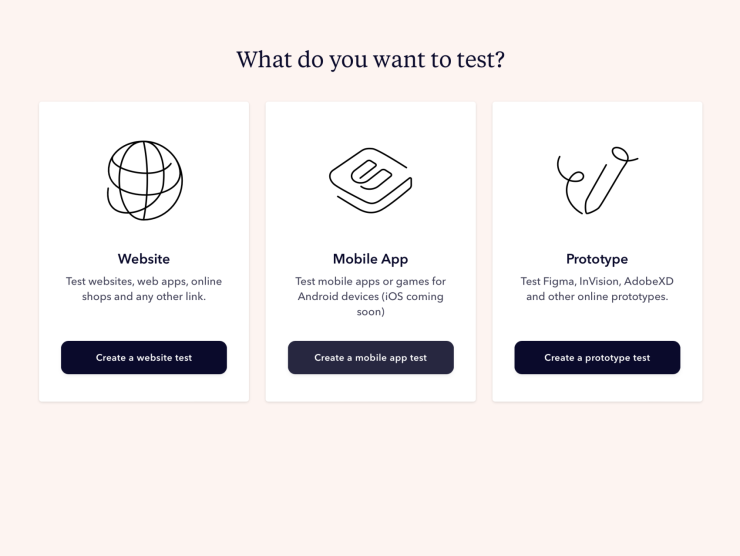
Step 1: Click ‘Create New Test’ and select ‘Mobile App’ from the list of options.
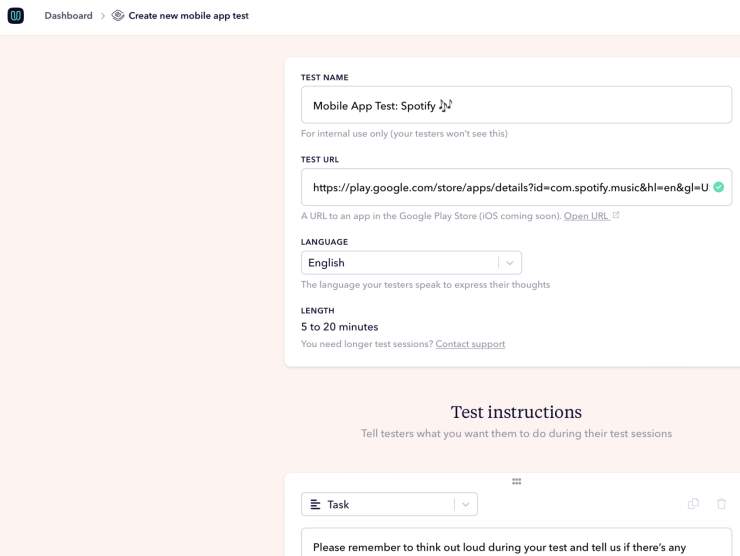
Step 2: Set up a user test as usual, and provide a link to your app in the Google Play store.
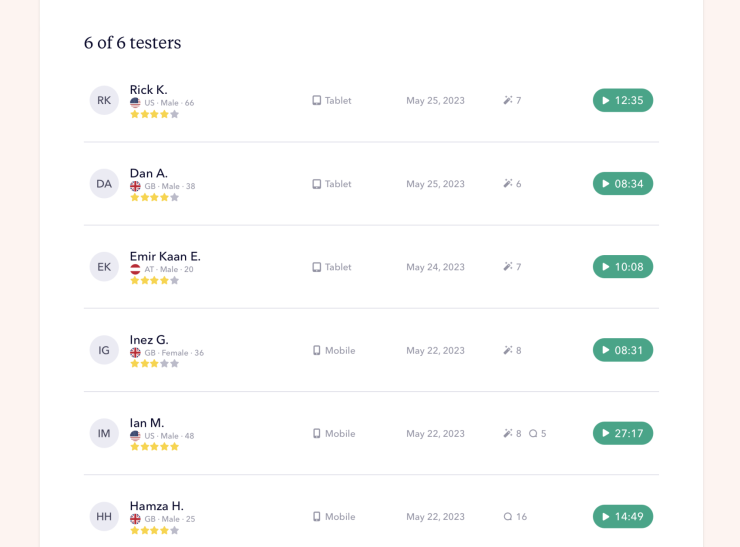
Step 3: Watch the completed user test videos in your Userbrain dashboard – complete with a full transcript, automated insights, and presentation-ready report!
With just three simple steps, you open a window into your users’ world, granting you the power to craft an exceptional user experience on your Android or iOS app.
Wrapping up: embracing mobile app testing
We are beyond thrilled to launch mobile app testing, taking us one step closer to our vision of a world where every product is created with the user in mind. This is our users’ accomplishment as much as ours, and we cannot wait to see the remarkable Android and iOS apps our users will refine and create with Userbrain.
For us, mobile app testing for Android and iOS is just another step forward in our mission, another piece of the puzzle to help Userbrain become the go-to testing tool for every UX Designer and Product Manager. We’re committed to constantly improving and expanding our tools to better serve you. Stay tuned as we continue to listen, learn, and innovate based on your invaluable feedback.
Remember, with Userbrain’s mobile app testing software, you are not just testing; you are learning, improving, and growing. Let’s continue to make digital products that improve lives together.
Get started with mobile app testing
Why are you still here? It’s time to elevate the user experience of your Android or iOS app with Userbrain’s user testing tool. Chop chop!
Whether you’re new to Userbrain or have been with us on this journey, we invite you to begin your first mobile app test.
Start your free trial today and discover hidden user insights in your mobile app with two free user tests. 🏆
Schedule a call – we’d love to hear from you! 👋
Should you have any questions or need help getting started with mobile app user testing, we’re here for you. Don’t hesitate to schedule a call with us. We value your feedback and are always ready to support your user testing journey.